It is possible to create a dropshipment via the Info Webshop. Imagine a customer in your store who wants a specific product that you do not have in stock, you can create a dropshipment in the Info Webshop and the customer receives the product the same day or the next day. All of a sudden you can sell everything, even products you don't have in stock.
Step 1
Log in to the Info Webshop and check whether the items you need for 1 dropshipment order are in stock. Place the items in the shopping cart by clicking on "Bestel (Order)" en go to the shopping cart. Click on "Verder (Next)".
Step 2
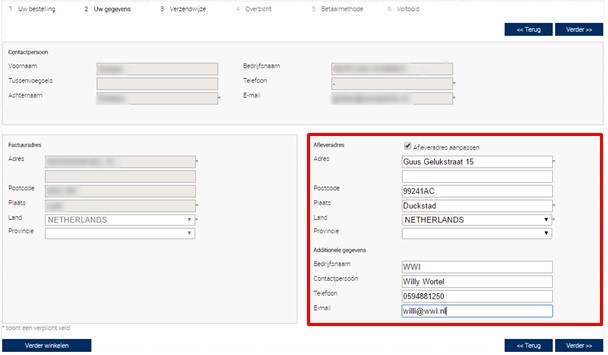
Change the delivery address to the address of the customer, don't forget to fill in the e-mailaddress of the customer, this is mandatory.
Step 3
Click on "Verder (Next)", you are now in Step 3 (Delivery Method). Choose the delivery method you prefer. Finish the process and we will take care of the rest.
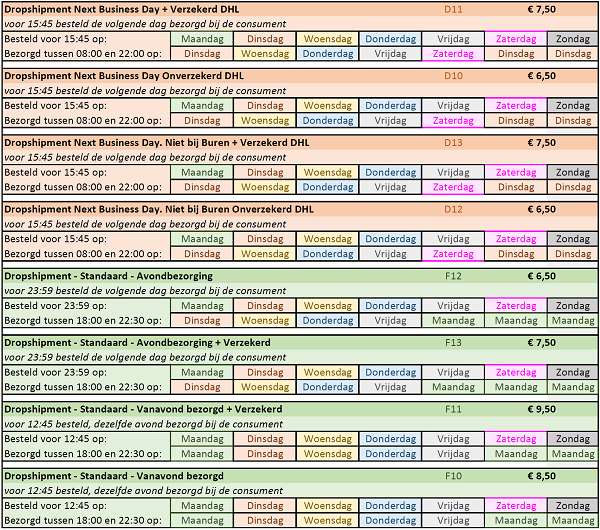
The standaard delivery method is "Avondbezorging" which means delivery between 18:00 and 22:30 at night. Everything you order before 12:45 will be delivered the same evening (Dropshipment, Standaard, Vanavond bezorgd). Everything you order after 12:45, but before 23:59 will be delivered the next day (Dropshipment, Standaard, Avondbezorging). Explain to the customer that his package will be delivered between 18:00 and 22:30. The Same Day Delivery is currently only availebel in the Netherlands, it will be possible in Belgium in the first quarter of 2017. For Belgium you can only use DHL for now.
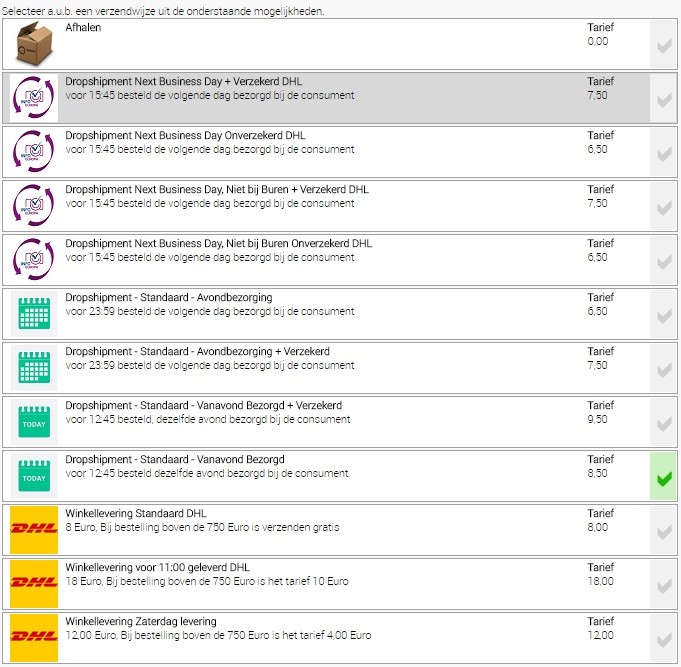
In the table below you can see on what day we deliver and when you have to fill in the dropshipment request on our Webshop.